Chat Widget
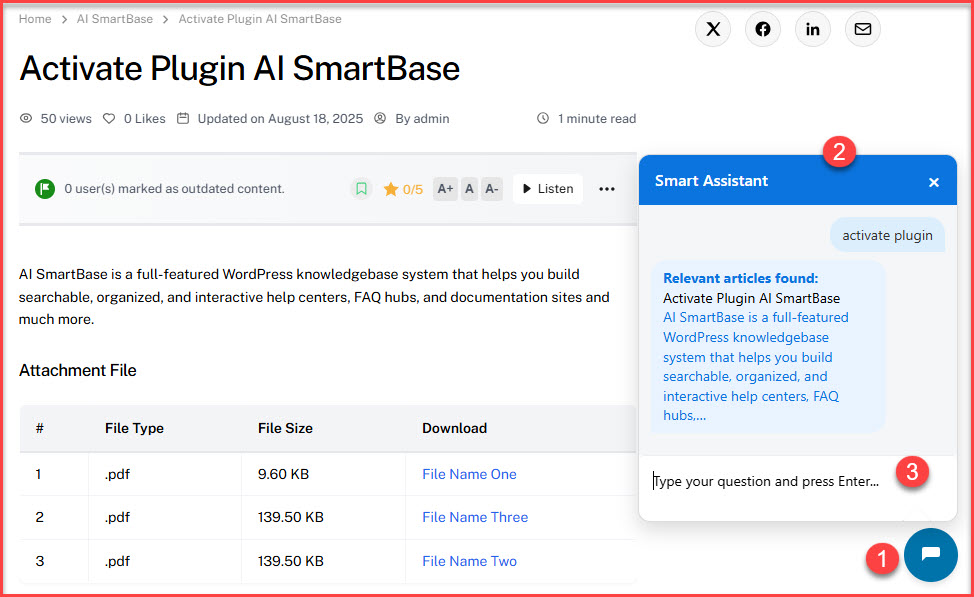
The Chat Widget provides users with instant assistance directly from the interface.
- If an OpenAI API key is configured, the widget delivers AI-enhanced search results, offering more accurate and context-aware responses.
- If the API key is not available, the widget defaults to a content-based search, retrieving results from the knowledge base.
- Private or restricted content is automatically excluded from all search results to ensure secure access.
Enable/Disable Chat Widget
To enable or disable the Chat Widget:
- Go to Settings > On/Off Tab.
- Under General Options, turn ‘Chat Widget’ On or Off as needed.
This feature ensures that users can quickly find the information they need while maintaining content privacy.
Was this helpful?
0 out of 0 found this helpful
Still no luck? We can help!
Get in touch with our friendly support team.
Recently Viewed Articles
- Loading recently viewed articles...